
What Is Laser Kerf and Why Does It Matter?
Laser cutting looks “perfect” from the outside: you draw a line in CAD, the machine follows it, and the part drops out cleanly. But in real life, the laser doesn’t cut a zero-width line. It removes a thin strip of material as it goes. That removed strip is called kerf, and it can be the difference between a part that fits beautifully and a part that’s too loose, too tight, or simply the wrong size.
This guide explains laser kerf in plain language: what it is, what affects it, how to measure it, and how to design around it so your parts come out right.
What is Laser Kerf?
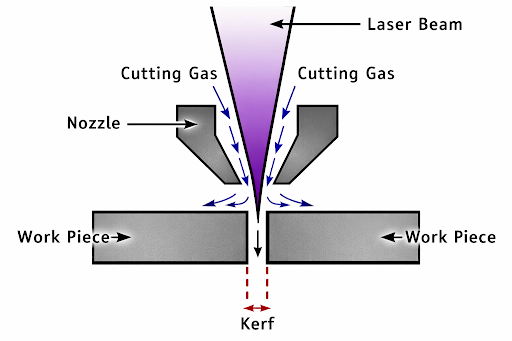
Laser kerf is the width of material removed by the laser during cutting. Think of it as the “gap” left behind after the cut is made. In woodworking, kerf is the thickness of a saw blade. In laser cutting, it’s the width of the cut channel created by the beam and heat.
Even if your laser follows the drawing line exactly, the finished part edges are slightly offset because material has been vaporised or melted away. And that kerf width is not always the same. It changes depending on the material and cutting settings.
Why Kerf Matters for Laser Cutting?
Kerf sounds like a tiny detail until you start assembling parts.
1. It Affects Final Dimensions
If you design a square using a laser cutting process that should be 100.00 mm wide, the cut square may come out a little smaller (or larger), depending on whether the laser cut is on the outside or inside of your line and how your software handles offsets. If you ignore kerf, you can end up outside your tolerance without realising why.
2. It Decides Whether Parts Fit Together
Press-fit tabs, slots, finger joints, and interlocking designs are extremely sensitive to kerf. A kerf difference of 0.10–0.20 mm can change a “nice snug fit” into “won’t go in” or “falls apart.”
3. It Affects Text, Small Holes, And Fine Details
Small internal shapes like holes, slots, and tiny cutouts are where kerf surprises show up fastest. A small hole can become noticeably oversized, and thin features can burn away or become fragile if cut lines are too close together.
4. It Impacts Nesting And Material Usage
When you place parts close together to reduce waste, kerf and heat can cause problems. If cut paths are too close, edges can overheat, warp, or merge. Very tight spacing can also make delicate details burn away.
5. It Influences Edge Quality
Kerf isn’t only about size. A wider or inconsistent kerf often comes with more heat input, more melting, rougher edges, taper, or dross, especially in thicker metals.
What Causes Kerf In Laser Cutting?
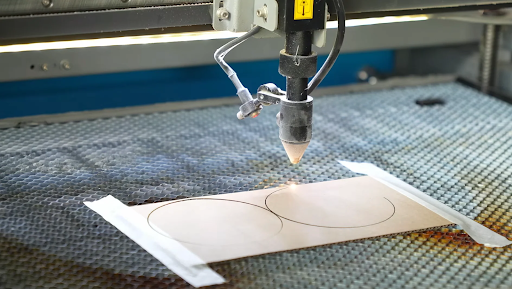
A laser beam is focused into a tiny spot with very high energy. That energy melts, vaporises, or burns the material. Assist gas (like oxygen, nitrogen, or air) helps push molten material out and keeps the cut going.
Because the beam has a spot size (and because heat spreads a bit into the material), the cut ends up wider than an “infinitely thin” line. Kerf also varies along thickness in some cases, creating a slight taper from the top to the bottom of the cut.
Typical Kerf Ranges: Real-World Expectations
Kerf depends heavily on machine type and material. As a broad practical range, laser kerf is often around 0.1 mm to 0.5 mm for common laser cutting work, with variations by material, thickness, and settings.
For example, thin metal on a well-tuned fiber laser can sometimes be around the 0.10–0.15 mm area, but the kerf can increase if the setup is off, the parameters change, or the material thickness increases.
Best practice: don’t rely on generic numbers if fit matters. Measure kerf on your machine, with your settings, on your material batch.
The Main Factors That Change Kerf Width
Kerf is not random. It changes for clear reasons.
Material Type
Different materials react differently to heat. Metals conduct heat differently (stainless vs mild steel vs aluminium). Acrylic can leave smooth edges, while plywood may char. Some plastics melt and re-solidify along the edge. Because the material’s behavior changes, the kerf changes too.
Material Thickness
Thicker material usually needs more energy and time to cut through. That often increases kerf or creates taper, especially if the cut is close to the machine’s limit for that material.
Focus Position And Lens Condition
A laser cuts smallest when properly focused. If the focus is too high or too low, the beam spot at the surface grows, and the kerf can widen. Dirty optics can reduce cutting efficiency and lead operators to slow down or increase power, which can also widen the kerf.
Speed And Power Settings
Too slow or too much power creates more heat, more melting, and a wider cut. Too fast or too little power can cause incomplete cutting, heavy striations, or parts not separating cleanly. Kerf is strongly tied to speed and power.
Assist Gas Type And Pressure
Assist gas helps remove molten material and affects how efficiently the cut progresses. It also changes edge appearance and, in metal cutting, can affect oxidation and cleanliness. This can influence kerf and edge finish.
Machine Condition And Alignment
Nozzle alignment, bed leveling, worn parts, and inconsistent motion can make kerf inconsistent across the sheet. Even if the average kerf is correct, variation is what causes assembly problems.
How To Measure Kerf: The Practical Way
If your goal is parts that fit, measuring kerf is one of the easiest high-impact tests you can do.
Method A: A Simple Square Test
- Draw a square of a known size (example: 25.4 mm).
- Cut it with the exact settings you plan to use.
- Measure the cut piece with calipers.
- The difference between the intended size and the measured size helps you estimate kerf.
Method B: Kerf Test Patterns
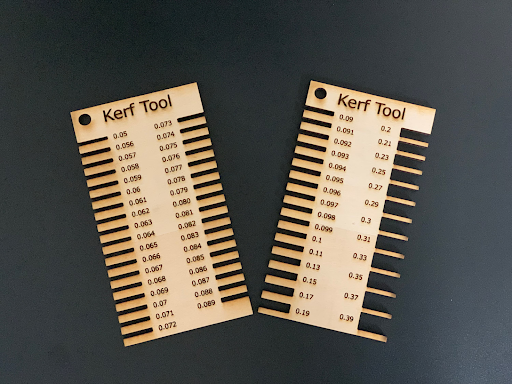
Kerf test patterns can help you find the right kerf compensation without doing a lot of math. These are especially useful for press-fit designs and repeat production settings.
Tip: Measure kerf separately for different materials and thicknesses, and re-check if you change lens, nozzle, or major settings.
Method C: Use Kerf Tool
There are kerf tools available that you can use to to meausre your desired kerf. Here are some examples of such tools.
Kerf Compensation: How Designers Cancel Out Kerf
Once you know kerf, you can design parts so they come out the correct size.
The Idea In One Sentence
You offset the cut path by half the kerf width (or adjust dimensions) so the final edge ends up where you intended.
Outside Cuts Vs Inside Cuts
Outside cuts (cutting around the outside of a part) remove material outward, and the part can end up slightly smaller if not compensated. Inside cuts (holes, slots) remove material inward, and holes or slots can end up larger.
Where To Apply Compensation
You can compensate in a few places:
- In CAD (adjust slot widths, tab widths, hole diameters)
- In CAM or laser software (kerf offset settings)
- In design generators (finger joint tools, box generators, and similar tools)
Practical rule for press fits: make a small test strip with multiple slot widths (like 0.00 mm, +0.05 mm, +0.10 mm, etc.). Choose the fit you want, then use that value in the final design.
Kerf In Different Kinds Of Projects
Sheet Metal Brackets And Enclosures
If you’re cutting holes for fasteners, tabs for bending, or slots for assembly, kerf can stack up across multiple features. Even small errors repeat across a full enclosure.
Good habit: put critical hole patterns and tab-and-slot fits on a test coupon before running full sheets.
Acrylic Signage And Decorative Cuts
Acrylic can look great after laser cutting, but tiny internal corners and thin lines can be fragile. Keeping detail sizes realistic and spacing cut lines appropriately reduces burn and warping issues.
Plywood And MDF: Finger Joints And Boxes
Wood-based materials can show kerf changes with resin content, moisture, and layer structure. A kerf value from last month may not match today’s sheet, so a quick test cut before a big job can save time.
Practical Tips To Control Kerf And Get Consistent Results
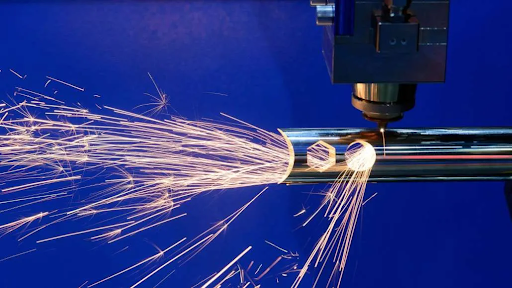
- Measure kerf using the exact settings you plan to run.
- Keep optics and nozzle clean and aligned.
- Use the correct focus for the material thickness.
- Avoid designing tiny gaps between cut lines.
- Do a small fit test for every press-fit job.
- Document kerf values like a recipe: material, thickness, speed, power, focus, gas, nozzle size, and measured kerf.
Conclusion
Laser kerf is the small amount of material removed by a laser as it cuts, but it plays a big role in how accurate and usable a finished part is. Kerf affects final dimensions, hole sizes, edge quality, and how well parts fit together in assemblies. Factors such as material type, thickness, focus, cutting speed, power, and assist gas all influence kerf, which is why it can change from one job to another.
By measuring kerf with simple test cuts and applying proper compensation in design or cutting software, it becomes much easier to achieve consistent and accurate results. Taking the time to understand and control kerf helps reduce material waste, avoid rework, and ensure parts fit and function exactly as intended.
FAQs
[saswp_tiny_multiple_faq headline-0=”h4″ question-0=”Can Kerf Cause Parts To Warp Or Distort?” answer-0=”Yes, kerf can contribute to warping, especially in thin materials. Excess heat from slow cutting speeds or high power can build up along the cut line, causing the material to bend or twist. Proper settings, correct focus, and allowing space between cut paths help reduce heat-related distortion. ” image-0=”” fontsize-0=”18″ fontunit-0=”px” count=”1″ html=”true”]
[saswp_tiny_multiple_faq headline-0=”h4″ question-0=”Does Kerf Change Over Time On The Same Machine?” answer-0=”It can. Wear on nozzles, lenses, and other components can slowly change cutting behavior. Even small changes in alignment or optics cleanliness can affect kerf, which is why regular maintenance and occasional re-testing are important for consistent results.” image-0=”” fontsize-0=”18″ fontunit-0=”px” count=”1″ html=”true”]
[saswp_tiny_multiple_faq headline-0=”h4″ question-0=”Is Kerf Different On The Top And Bottom Of The Cut?” answer-0=”In some cases, yes. The cut can be slightly wider at the top than the bottom, or vice versa, especially in thicker materials. This taper happens due to focus position and how the laser energy spreads as it travels through the material. ” image-0=”” fontsize-0=”18″ fontunit-0=”px” count=”1″ html=”true”]
[saswp_tiny_multiple_faq headline-0=”h4″ question-0=”Should Kerf Be Considered When Cutting Bends Or Fold Lines?” answer-0=”Yes. When cutting parts that will be bent later, kerf can slightly affect bend allowances and tab positions. Ignoring kerf may lead to misalignment during assembly, especially in precision sheet metal work. ” image-0=”” fontsize-0=”18″ fontunit-0=”px” count=”1″ html=”true”]
[saswp_tiny_multiple_faq headline-0=”h4″ question-0=”Can Kerf Affect Surface Finish Near The Cut?” answer-0=”It can. A wider kerf often means more heat input, which can discolour metals, increase burrs, or roughen edges. Dialling in correct settings helps keep both kerf and surface finish under control. ” image-0=”” fontsize-0=”18″ fontunit-0=”px” count=”1″ html=”true”]
[saswp_tiny_multiple_faq headline-0=”h4″ question-0=”Is It Possible To Reduce Kerf To Zero?” answer-0=”No. Every cutting process removes material, so kerf can never be completely eliminated. The goal is not zero kerf, but consistent and predictable kerf that can be compensated for in design. ” image-0=”” fontsize-0=”18″ fontunit-0=”px” count=”1″ html=”true”]
[saswp_tiny_multiple_faq headline-0=”h4″ question-0=”Do Different Batches Of The Same Material Have Different Kerf?” answer-0=”Yes, this can happen. Changes in coating, alloy composition, moisture content, or surface condition can slightly affect how the laser interacts with the material. A quick test cut is recommended when switching material batches. ” image-0=”” fontsize-0=”18″ fontunit-0=”px” count=”1″ html=”true”]
[saswp_tiny_multiple_faq headline-0=”h4″ question-0=”When Is Kerf Most Critical To Check?” answer-0=”Kerf is most critical when tight tolerances are required, when parts must press-fit together, or when designs include small features and fine details. In these cases, even small kerf changes can cause noticeable problems in assembly or function. ” image-0=”” fontsize-0=”18″ fontunit-0=”px” count=”1″ html=”true”]